Automate the opening of your favorite apps
- Détails
- 3374
Maybe each morning you have to open some softwares, websites or any apps before to start working.
For me: my professional email box (Outlook), my personnal email box (Gmail), my testing email boxes (Thunderbird, Yahoo ...), Teams, the official CRM of my company, the unofficial CRM of my company, the marketing tools of my company, my Google shortcuts ... Hum, tired in the morning!
Thanks to Python and his libraries os and webbrowser, we can save time and neurons. Just add the code below in a Python script:
import os
import webbrowser

os.startfile("outlook")
os.startfile("thunderbird")

webbrowser.open('https://hg-map.fr/')

os.startfile(r"C:\Users\Georges\Desktop\Communications\Gmail.lnk")
os.startfile(r"C:\Users\Georges\Desktop\Communications\Microsoft Teams.lnk")
os.startfile(r"C:\Users\Georges\Desktop\Communications\Yahoo.lnk")
Clicking into will open your favourite applications. Me I prefere store my scripts in a dedicated folder, and then add shortcuts on my desktop.
Maybe you should adapt the code according your OS and your apps subtilities. Here above for example, Outlook and Thunderbird are recognized by Python, and just need to mention their system names to the os library. A website need the webbrowser library, and the Google shortcuts need the os library but from their full paths.
Symfony 4
- Détails
- 181774
Cet article n'est pas l'article d'un spécialiste de Symfony. Je défriche ici les grandes possibilités du framework, dans sa version 4, en fusionnant/vulgarisant plusieurs tutos glânés sur internet. L'objectif est surtout de me construire un mémo d'apprentissage de Symfony 4, que je souhaite utiliser pour le déploiement de SCRUD plus ou moins complexes et d'API.
- Testé en local sous Windows.
- Wamp doit être installé, disposant d'une version de PHP 7 minimum.
- Installez également Composer, en mode développeur, en lui mentionnant la dernière version de PHP pendant l'installation.
Composer est dorénavant indispensable pour démarrer un projet Symfony 4 (et l'Installer ne l'est plus). De même il n'est plus nécessaire de déclarer les dépendances dans le Kernel.
Il vous faudra redémarrer votre machine pour prendre en compte Composer. Ensuite la commande composer -v doit afficher des informations de version.
Intégrer PHP aux variables d'environnement Windows
Si ce n'est pas déjà fait (testez php -v) :
set PATH=%PATH%;C:\wamp\bin\php\php7.2.4
Ensuite la commande php -v doit afficher des informations de version.
Découverte de QGIS, PostGIS et de quelques formats associés
- Détails
- 79778
Nous allons voir les 1ères opérations de prise en main de QGIS. QantumGIS n'est que la partie émergée d'un système très performant : le couple QGIS-PostGIS, que nous aborderons.
Nous prendrons même le temps de taper quelques lignes de SQL, directement dans QGIS.
QGIS, logiciel SIG open-source et gratuit, se télécharge puis s'installe aisément après avoir vérifié la binarité de votre machine. Nous travaillerons ici sous Windows et sur la version 2.18.12 (Las Palmas).
Cette dernière version déposera un répertoire sur votre bureau. Explorez-le, QGIS est aujourd'hui composite et vous n'avez pas installé que ce seul SIG.
Dans la foulée installez PostgreSQL et son interface de gestion PgAdmin 4, via le pack EnterpriseDB et l'utilitaire StackBuilder. Pensez à bien sélectionner l'installation de PostGIS également. Stackbuilder est toutefois un logiciel qui va s'installer sur votre machine, et que vous pourrez ré-utiliser par la suite.
The Webmaster's doggy joke
- Détails
- 2746

Thanks to dog.ceo and its API, you can display a random beautiful dog in a website. Just add the code below in your PHP:
<img style="width: 100%;" src="<?php
$my_json = "https://dog.ceo/api/breeds/image/random" ;
$my_content = file_get_contents($my_json);
$my_content_dec = json_decode($my_content);
$url_img = $my_content_dec->message ;
print $url_img;
?>" alt="Oh my dog!" title="Oh my dog!">
To restrict the joke to your users (more polite), just enclose the code with this kind of PHP condition.
<?php if ($user->id != 0): ?>
   ...
<?php endif; ?>
In Joomla a perfect spot to put it: templates/your_template/index.php, into the <div id="aside" class="span3">.
Please let me know if you find other APIs like it!
Fix unwanted line breaks with Notepad and some regex
- Détails
- 5534
When you have to import files as text, csv, etc ... into an SQL database, non-desired line breaks (often from notes fields, text boxes, <BR> tags, tabs, or other misinterpreted HTML ...) are very painful. It may fail your import, or be a waste of time. Exploring one's file with Notepad is sometimes necessary.
Complete 4-step correction
How to effectively manage these line breaks?
In this standard example, we want to identify and fix lines that do not start with a double quote (caused by line breaks) within a file where healthy lines start with a double quote.
Django REST API
- Détails
- 22878
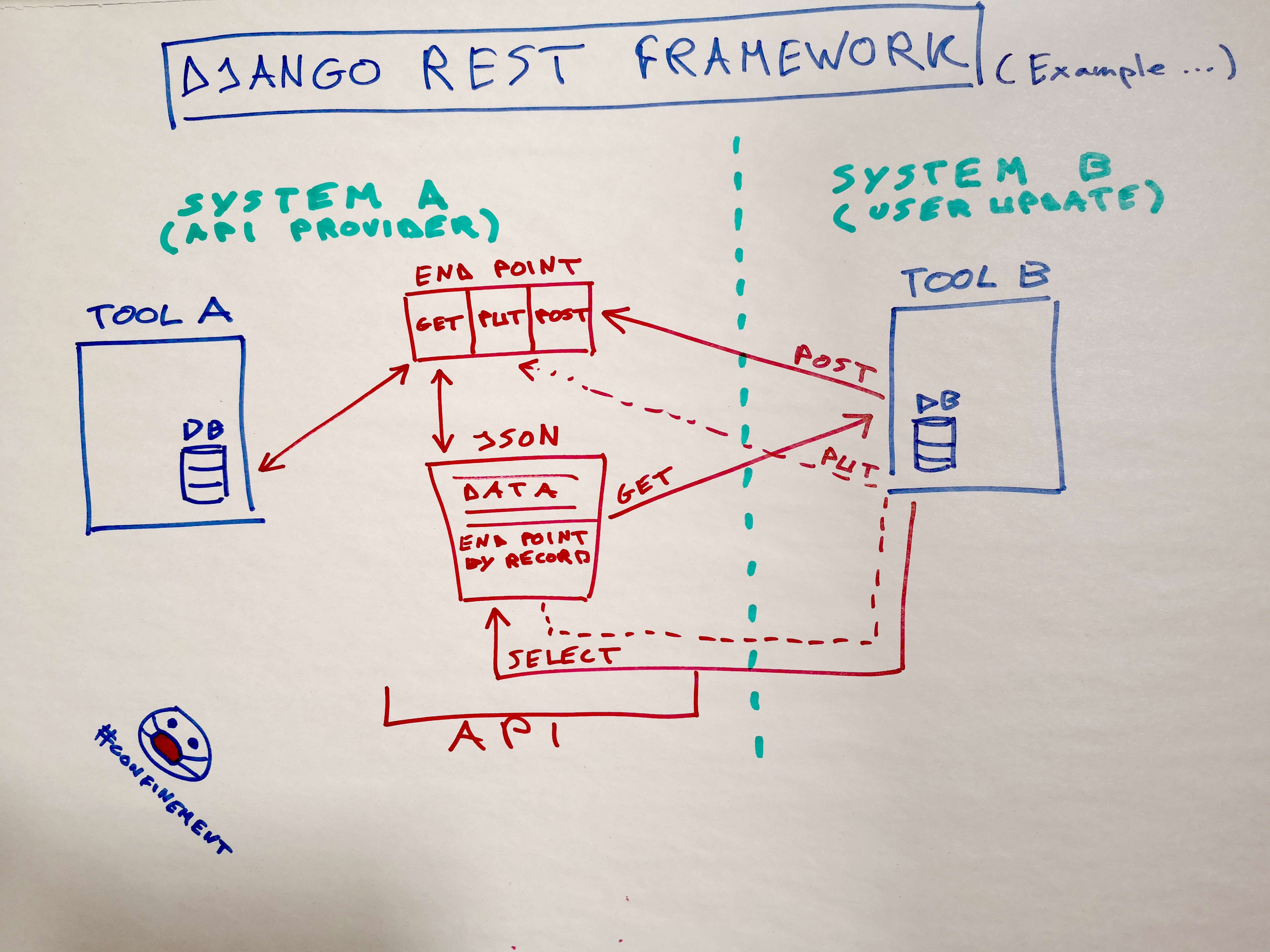 Here some tips about Django REST Framework (DRF) with Django 3.
Quick install
> pip install djangorestframework
Then in settings.py:
INSTALLED_APPS = [
    ...
    'rest_framework',
]
Let's go!
Page 4 sur 6